.svg)
.svg)

.svg)
.svg)

Copied to Clipboard

Ready to get Started?


Key Takeaways
Strategic value: Payroll reports drive strategy, not just compliance. They help forecast costs, compare markets, and show the real expense of global teams.
Scalable reporting: Combining summary, tax, benefits, and multi-country views keeps HR and Finance both compliant and informed.
Automation benefits: Centralized, automated payroll reporting cuts errors, prevents penalties, and frees teams for strategy.
A payroll report is a detailed document that summarizes employee compensation, deductions, taxes, and employer contributions for a specific pay period. It provides the essential data HR and finance teams need to track labor costs, ensure tax compliance, and make informed workforce decisions.
And right now, payroll is taking up a bigger share of company budgets than ever before – 61% of employers are increasing what they spend on compensation. For HR and finance leaders, that shift raises a bigger question: are you getting the insights you need from your payroll reports to make sense of those rising costs?
Done well, a payroll report is a clear snapshot of how wages, benefits, and taxes stack up across every country you operate in. For teams scaling globally, that visibility means the difference between simply paying people on time and truly understanding the financial health of your workforce. In this guide, we’ll walk you through the essentials – the different types of payroll reports, how to build them, and how to overcome the challenges of reporting across borders with Playroll.
What is a Payroll Report?
A payroll report is a detailed document that summarizes employee compensation, deductions, taxes, and contributions for a specific period. At its core, it answers the fundamental questions every employer needs:
- What did employees earn during this pay period?
- How much was withheld for taxes and benefits?
- What are the company's tax liabilities and contributions?
In the U.S. domestic payroll reports often focus on items like Form W-2, Form W-3, Form 941, FUTA tax, and state unemployment contributions. Global payroll reports go further, consolidating data across currencies and tax jurisdictions while helping you and your finance department understand the full cost of distributed teams.
U.S. vs. Global Payroll Reports Comparison
Key Payroll Terms Glossary
- Gross Pay: The total amount an employee earns before any deductions, including base salary, overtime, bonuses, and commissions.
- Net Pay: The final amount an employee receives after all deductions for taxes, benefits, and other withholdings have been subtracted from gross pay.
- FUTA (Federal Unemployment Tax Act): A federal payroll tax paid solely by employers to fund unemployment compensation programs, currently 6% on the first $7,000 of each employee's wages annually.
- SUTA (State Unemployment Tax Act): State-level unemployment taxes paid by employers (and sometimes employees) with rates and wage bases varying by state.
- Form 941: A quarterly federal tax return that employers file to report income taxes, Social Security tax, and Medicare tax withheld from employee paychecks.
- Form W-2: An annual form employers must provide to employees and the IRS by January 31, reporting total wages paid and taxes withheld during the previous calendar year.
Example of a Payroll Report Used in 2026
To make this concrete, let's look at what a payroll summary report typically contains. Imagine you're running payroll for a team with employees in the U.S., Germany, and Singapore. At the end of the pay period, your payroll software generates a consolidated view that captures the essentials in your billing currency:
- Employee Names and IDs: Provide clarity on who's being paid and allow you to match payments with contracts or HR records.
- Gross Wages and Bonuses: Show the full amount each employee earned before any deductions, including regular salaries, overtime, and commissions.
- Tax Withholdings: Detail how much has been withheld for federal income tax, state or local tax obligations, or country-specific equivalents overseas.
- Employer Contributions: Capture your company's share of statutory costs – such as Social Security and Medicare taxes in the U.S., unemployment insurance contributions, or local equivalents abroad.
- Net Pay: This is the figure employees actually see in their accounts. It's the bottom line after deductions and contributions are applied.
When presented together, these data points give you both a line-by-line view of individual employees and a high-level summary of your total payroll liabilities for the period. This will allow you to build up a record that supports compliance, financial planning, and workforce analysis.

Key Components of a Payroll Report
Every employee payroll report provides a baseline view of wages and taxes, but the most useful reports share common building blocks:
- Pay Period: Defines the exact timeframe the report covers, such as weekly, bi-weekly, or monthly. A clear pay period ensures accurate calculations and makes it easier to compare payroll data over time.
- Gross Pay and Net Pay: Gross pay reflects total earnings before deductions, while net pay shows what employees actually take home. Tracking both figures will give you the true cost of labor and provide transparency for your team.
- Deductions and Tax Withholdings: This includes income tax, benefits, retirement contributions, and other voluntary or mandatory deductions. Detailed reporting helps employees understand their pay and keeps companies compliant.
- Employer Taxes and Liabilities: Captures company obligations like FUTA tax, state unemployment (SUTA), and Social Security and Medicare taxes. Monitoring these liabilities avoids underpayments, penalties, and cash flow surprises.
- Compliance Documentation: Payroll data must align with required forms such as Form 941, Form W-2, and Form W-3. Globally, equivalent filings exist in every country, and accurate reports keep you on the right side of regulators.
6 Types of Payroll Reports: From Basic Summaries to Advanced Global Analytics
When your company scales across borders, you’ll need sophisticated payroll data analytics and reporting if you’re going to gain a competitive edge. That means investing in a comprehensive payroll system that can generate customized reports depending on what information you need.
Different payroll reports serve different purposes. Some give you snapshots, others drill down into the detail, and a few are built specifically for compliance or global consolidation. All give you and your team the flexibility to manage both domestic and international labor law requirements. Below are several of the most common types, what makes each unique, and when you should use them.
Types of Payroll Reporting

1. Payroll Summary Report
A payroll summary report gives you a high-level view of payroll activity over a given time period (weekly, bi-weekly, monthly, or custom). It shows aggregated totals rather than line-by-line detail, making it ideal for any leadership team to review overall spend, tax obligations, and budget variance without wading through every individual transaction.
Examples of what you'll typically see in a payroll summary report:
- Total gross wages for all employees over the pay period.
- Sum of employer contributions (e.g., Social Security, Medicare taxes) and tax liabilities.
- Total net pay and total deductions across the workforce.
- Comparison of payroll costs to prior periods (e.g. previous month, same period last year).
2. Employee Payroll Detail Report
For understanding what's happening beneath the surface, an employee payroll detail report breaks down payroll by individual employees. This type of payroll report is useful when you need to audit, investigate discrepancies, or be transparent with employees about how their pay is calculated.
What you'll find in this report:
- Each employee's hours worked, overtime, bonus, and commission details.
- Every deduction and tax withheld (federal, state/local, or country-specific), plus benefit or retirement contributions.
- Employer's matching or contribution components tied to each employee.
- Per-employee net pay and adjustments (like retroactive changes, corrections).
3. Tax Liability and Compliance Reports
These reports focus specifically on what you owe to tax authorities (federal, state, and/or local) and whether your payroll meets regulatory standards. They are typically used for filing returns (e.g., Form 941, FUTA, etc.), preparing W-2s, or complying with international equivalents.
Key regulatory deadlines to track:
- Form 941: Due quarterly by the last day of the month following the quarter end (April 30, July 31, October 31, January 31)
- Form W-2: Must be provided to employees and filed with the SSA by January 31
- FUTA (Form 940): Annual return due January 31, with quarterly deposits required if liability exceeds $500
- Late filing penalties: Form 941 penalties range from 2% to 15% of unpaid tax depending on delay; W-2 late filing penalties range from $60 to $330 per form depending on how late
Typical inclusions:
- Breakdown of all payroll taxes owed by employer and withheld from employees.
- Data to support forms like Form 941 (U.S. quarterly return), FUTA, W-2 (annual), or local tax filings for non-U.S. jurisdictions.
- Details about state unemployment contributions or other mandatory contributions by region.
- Filings schedule and due dates, plus checks for missing or late payments.
4. Leave / PTO & Benefit Reports
These reports help you track non-wage costs and liabilities that don't always show up in basic wage summaries but are crucial for painting the full payroll picture. Leave, paid time off ( PTO), sick leave, and benefits like health or retirement impact both your cash flow and future budget planning.
What to expect:
- Accruals of vacation, sick leave, maternity/paternity leave, etc., for each employee.
- Usage vs. remaining leave balances.
- Cost of benefits deducted from gross pay and employer matching where applicable.
- Projections of leave liabilities (e.g. if leave is carried over year to year or paid out on termination).
5. Global Consolidated Payroll / Multi-Country Reports
For companies with global teams, these reports aggregate payroll data across multiple jurisdictions. They handle currency conversions, multiple tax regimes, local compliance rules, and present everything in a unified view so you can see and compare labor costs accurately across borders.
You'll usually see:
- Wages and employer-tax costs converted to a single base currency for comparison.
- Country-by-country summaries: gross pay, deductions, contributions under local tax/social laws.
- Variances between countries (different tax rates, benefit rules, labor laws) to help spot cost anomalies.
- Global totals and breakdowns for forecasting and budgeting.
6. Regulatory and Certified Payroll Reports
Some industries like healthcare, construction, and finance or public contracts require specialized, audited payroll reporting. And while it should be best practice for all payroll reporting to come with an audit trail, these certified payroll reports are often mandated by government contracts or public works. They include very precise data to show compliance with prevailing wage laws or other regulations.
Key features in these reports:
- Job classification, hours worked, wage rates for those classifications, and fringe benefits.
- Employee data required by law: name, address, identifiers, and pay breakdowns.
- Audit trails or proof (timesheets, approvals) to show compliance with regulation.
- Correct formats for required forms in various jurisdictions (including U.S. forms like certified payroll attachments, or foreign equivalents).

How To Create A Payroll Report: Step-by-Step Guide
Creating payroll reports can feel daunting, especially if you're juggling different pay periods, tax forms, and compliance rules across multiple jurisdictions. The good news is that the process follows a clear structure, and with the right payroll software, you can save time while minimizing human error.
Quick Summary: 5 Steps to Create a Payroll Report
- Choose the pay period and gather all payroll data
- Input data into your spreadsheet or payroll software
- Calculate wages, deductions, and employer contributions
- Verify compliance with tax forms and filing deadlines
- Generate, review, and distribute the final report
Below, we'll walk through the essential steps every U.S. HR, finance team, and founder should follow when creating a payroll report:
1. Choose the Pay Period and Gather Payroll Data
Start by defining the pay period – weekly, bi-weekly, semi-monthly, or monthly – since this sets the frame for all calculations. Then gather the necessary payroll data from your team: timesheets, salaries, overtime records, commissions, and bonuses. Consistency here ensures your payroll summary report aligns with both employee expectations and compliance requirements.
2. Input Your Data into a Your Spreadsheet (Or Use Payroll Software)
Once you have all of your data, you’re ready to start building out the actual payroll report. You need to enter all the essential payroll information: employee names, hours worked, salaries, overtime, bonuses, and any deductions or withholdings. In a spreadsheet, that means creating rows and columns for each category and updating them every pay period – a process that gets harder to manage as your headcount grows.
Pro tip: Payroll software like Playroll’s Global Payroll Manager, generates the reports for you. All you have to do is feed it your data, make some selections, and it’ll do the rest.
3. Calculate Wages, Deductions, and Contributions
Next, calculate gross wages, apply deductions, and determine net pay. Deductions might include federal and state income tax withholdings, retirement contributions, health premiums, or country-specific social contributions. On the employer side, don’t forget obligations like FUTA tax, state unemployment (SUTA), or international equivalents.
4. Verify Compliance with Tax and Reporting Requirements
Once calculations are complete, cross-check against any and all required tax forms and due dates. In the U.S., that means aligning numbers with Form 941 (quarterly return), Form W-2 (annual statements), and Form W-3 (transmittal of wage and tax statements).
Globally, each country has its own filings, so using payroll software that tracks local rules will reduce the risk of non-compliance.
5. Generate and Review the Payroll Report
Finally, generate your payroll report and review it carefully before distribution. Share the payroll summary report with your leadership team and individual reports for your employees (manually or through your payroll software’s accompanying app), and retain copies for audits.
A second set of eyes, particularly those in HR, finance, or even an external auditor, can help catch mistakes and protect your company against any compliance issues.
How Payroll Reports Help You Track Costs & Employees
Payroll reports give your team clear visibility into workforce costs while simplifying complex tax compliance. And as salary transparency becomes increasingly important for talent across the globe – both for meeting global regulations and shaping employee sentiment – transparent payroll reporting also builds trust in your team. Let's take a closer look at how:
Strengthen Financial Health and Forecasting
Payroll reports give you the full picture when it comes to wages, bonuses, overtime, and benefits. That visibility makes it easier to track costs and forecast future payroll expenses.
- Spot departments or roles driving higher costs than expected.
- Use historical payroll data to forecast hiring budgets and salary increases.
- Track indirect costs like paid leave, overtime, and sick days to plan more accurately.
Simplify Compliance and Avoid Penalties
Every pay period brings reporting obligations, and payroll reports help ensure you meet them. Having data aligned with tax forms will reduce the risk of errors and missed deadlines.
- Match data directly to filings like Form 941, W-2, W-3, and FUTA in the U.S.
- Meet country-specific reporting requirements for international teams.
- Avoid penalties, audits, and fines from inaccurate or late filings.
Enable Smarter, Data-Driven Decisions
The right payroll data goes beyond compliance to support strategic workforce planning. Reports highlight trends that guide better hiring, resource allocation, and retention strategies.
- Benchmark salaries against market norms to stay competitive.
- Spot turnover or overtime spikes that signal operational inefficiencies.
- Reallocate resources across departments to balance workloads and reduce burnout.
Reduce Errors and Save Time Through Automation
Manually calculating wages and taxes is error-prone. Automated payroll reporting speeds up the process while minimizing costly mistakes.
- Generate payslips, calculate withholdings, and file reports automatically.
- Cut down on manual data entry to free HR teams for strategic work.
- Improve accuracy in reporting across currencies and jurisdictions.
Build Employee Trust and Engagement
Transparency in payroll builds confidence across the workforce. If your team has access to payroll data themselves, that's one less thing on their plate and more time for tasks that are going to move the needle.
- Give employees 24/7 access to payslips, tax forms, and benefits.
- Improve satisfaction by ensuring pay and deductions are clear and accurate.
- Reduce HR workloads by cutting routine pay-related queries.
Global Payroll Reporting Challenges and Solutions
Scaling across borders is exciting, but it comes with an added layer of complexity. You’ll find yourself suddenly facing challenges that domestic operations rarely encounter – navigating compliance in multiple jurisdictions, accounting for fluctuating currencies, and reconciling fragmented data sources.
Without the right systems in place, these challenges can erode efficiency, create unnecessary risk, and land you in a lot of trouble with local authorities.
Compliance Across Multiple Jurisdictions
Each country has unique tax rules, filing schedules, and documentation standards. What’s due quarterly in one jurisdiction might be filed monthly in another, and penalties for errors can be steep. Keeping track of all those moving parts while keeping everything accurate and compliant at scale is one of the biggest hurdles for global HR and finance teams.
Practical Solution
The most effective platforms embed local compliance frameworks directly into reporting workflows. Align your reports with in-country rules automatically, and you can reduce the risk of fines, audits, or reputational damage for your business.
Currency Volatility and Cost Transparency
Paying employees in multiple currencies introduces uncertainty into payroll costs. Exchange rate swings can inflate or reduce labor expenses overnight, making it hard to maintain reliable budgets or compare costs across markets.
Practical Solution
Use an advanced reporting system to convert multi-currency data into a single base currency while preserving local detail. This approach will give you both a consistent global view and the granular insight you need for local decision-making.
Fragmented Systems and Data Silos
Many distributed teams still rely on a patchwork of local vendors, spreadsheets, and disconnected HR tools. This can quickly lead to hours lost in manual reconciliation, and reporting delays that prevent your leadership team from acting on real-time insights.
Practical Solution
Use a tool that can unify reporting platforms or multiple HRIS vendors to aggregate data across all markets in real time and automatically make any anomalies clear every payroll run. This creates a single source of truth that enables faster, more strategic decision-making.
Best Practices for Payroll Reporting Shared by Playroll Experts
Getting payroll reporting right means building processes that are accurate, scalable, and insightful. Based on our years of experience helping global companies manage distributed teams, here are best practices that can transform payroll reporting from a routine compliance exercise into a strategic edge:
Quick Wins: Do These Now
Long-Term Practices: Plan and Invest
Unify Multi-Vendor Payroll Data and Generate Global Reports With Playroll
Payroll reports should do more than meet compliance: that's the bare minimum. In today's data-driven world, your payroll system should give you absolute clarity and control over your success. You can do just that with Playroll's Global Payroll Manager.
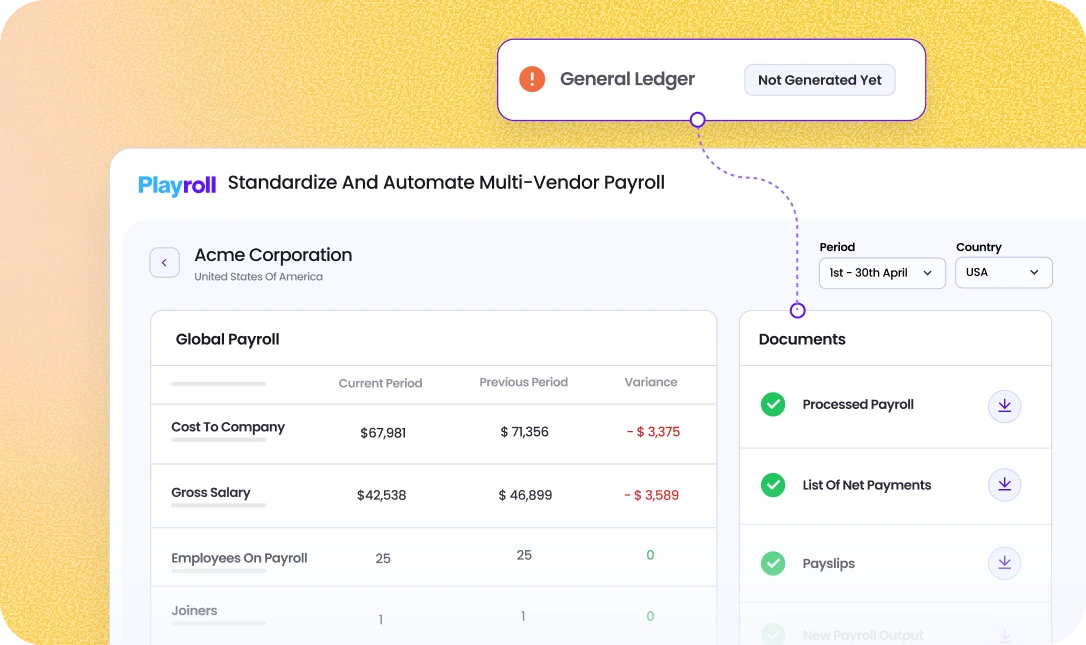
It brings multi-country data into one platform, automates reporting, ensures accuracy across currencies and regulations, and catches any anomalies through variance control. The result is real-time visibility into workforce costs and more time for HR and finance teams to focus on strategy.
Book a demo today and see how our solution can become your growth advantage.

ABOUT THE AUTHOR
Jaime Watkins
Jaime is a content specialist at Playroll, specializing in global HR trends and compliance. With a strong background in languages and writing, she turns complex employment issues into clear insights to help employers stay ahead of the curve in an ever-changing global workforce.
Payroll Report FAQs
What is a payroll report?

.png)
A payroll report is a document that summarizes employee compensation, tax withholdings, deductions, and employer contributions for a specific pay period. It provides the data needed to track labor costs, ensure compliance with tax regulations, and support financial planning.
What are the different types of payroll reports?
The main types include payroll summary reports (high-level overviews), employee detail reports (individual breakdowns), tax liability reports (for compliance filings), leave/PTO reports (tracking time-off costs), global consolidated reports (multi-country data), and certified payroll reports (for government contracts).
How often should payroll reports be generated?
Payroll summary and detail reports should be generated every pay period. Tax liability reports are typically needed quarterly (for Form 941) and annually (for W-2s). Global consolidated reports are most useful monthly or quarterly for companies with international teams.
How to prepare a payroll report?
To prepare a payroll report, you first define the pay period, gather payroll data such as hours worked, salaries, and bonuses, then calculate wages, deductions, and employer contributions. A payroll report should include gross pay, net pay, tax withholdings, and compliance documentation to ensure accuracy for both employees and regulators.
What is a certified payroll report?
A certified payroll report is a specialized report required for government contractors in the U.S. It verifies that employees working on public projects are paid fairly and in compliance with prevailing wage laws, and it usually includes detailed employee data, job classifications, hours, and wages.

Back to Top
.svg)








.svg)